



Platform

For your team

workflows

trust

pricing

The NDIS platform your practice actually runs on

Scheduling, clinical notes, NDIS invoicing and claiming, participant funding and reporting in one secure web app. Enter it once and it flows from booking to payment.

Inside the Creo app · drag widgets onto the dashboard, or switch to Reports
app.creocare.com.au/dashboard
NNorthside Therapy
PatientsPartnersCalendarBillingExercise Planner
MTMia Torres

Dashboard

Your personalised home screen.

All changes saved
Monthly Revenue
$86,420+9.8% on July
JanFebMarAprMayJunJulAug
Today’s Appointments
14 today, 3 booked online
J. Reid · Home visitCompleted
A. Kowalski · ClinicNote to finish
S. Haddad · Community accessConfirmed
Ava Nguyen · TelehealthBooked online
Staff Travel Times Today
Mia T.
52 min
Josh L.
38 min
Priya S.
1h 05m
Tom W.
24 min
Rough estimate (straight-line distance + average driving speed), not live traffic.
Billed Hours (MTD)
412.5h186 unique clients seen
Outstanding / Overdue
$14,260$3,180 overdue, 3 invoices
Reminders
Renew service agreement, A. Kowalski28 Aug
Plan review, J. Reid (ends 30 Nov)2 Sep
New reminder…+ Add Reminder
Invoice Status
Paid128
Sent41
Draft12
Partial6
Overdue3
Weather & Road
19°Light rain, Parramatta. Allow extra time on the M4.
Entered once Booking→ Session note→ Invoice→ NDIS claim→ Funding balance
Built for providers supporting
NDIS providers and allied health, from sole practitioners to multi-site teams
A child playing with a support worker
01Early childhood
A group therapy session
02Psychology
People sharing food at a market stall
03Daily living skills
People applauding at a community event
04Community participation
A support group sitting in a circle
05Group programs
A speech pathologist working with a child
06Speech pathology
People walking in a park with exercise mats
07Exercise physiology
Friends gathered around a woman in a wheelchair
08Social and recreation

Running an NDIS practice should feel like care, not admin

Most providers juggle a calendar, a notes system, funding spreadsheets, accounting software and the NDIS portal. Staff re-type the same details into each one. Creo puts them in one place.

Follow one session through Creo
A support worker talking with an older participant at home
Funding balance, updated just now
Capacity Building, daily activities
$12,480 usedof $19,200
1 entryDetails typed once, then carried from booking to note, invoice and claim
5 rolesFrom Owner to Staff, so each person sees what they need
0 installsRuns in any web browser at app.creocare.com.au
SydneyHosted in Australia on AWS, with encrypted storage

One profile per participant. Every team looking at it.

Reception, practitioners and billing work from the same record. A session moves from the calendar to the note, the invoice, the claim and the funding balance without anyone typing it again.

01 / Participants

Funding you can see before it runs out

Each budget is tracked by NDIS category, with a live view of how much has been used.

Funding · Ava Nguyen
Core72% used
Capacity Building48% used
Capital15% used
Plan ends 30 NovReview due with support coordinator
Expiring soon
02 / Scheduling

Online booking, and reminders that cut no-shows

Participants book from a public page with no login. Reminders go out by SMS or email before every appointment.

Upcoming (Next 7 days)
Ava N. · 10:30Booked online
New
J. Reid · 09:00SMS reminder sent
Confirmed
Reminders sent this week412
81% confirmed6% rescheduled
03 / Billing

Completed sessions become invoices in one click

Item numbers, unit rates and price limits come from the built-in NDIS Support Catalogue, so invoices stay within the rules.

Uninvoiced Appointments
38 sessionsItem numbers and price limits from the NDIS catalogue
DraftSentPartialPaid
PRODA bulk file21 NDIA claims ready
Create invoices
What the platform does

Nine modules. One login.

Everything an NDIS practice needs from the first booking to the final payment, available today in any browser.


A diverse group of people outdoors A participant on the phone at home A speech pathologist working with a child Invoices and paperwork on a desk A boy and a woman looking at a tablet Two colleagues reviewing a laptop A team meeting around a desk People walking in a park carrying exercise mats Hands raising cups together outdoors Module 01 of 09

Client management

Everything about each participant, in one profile.

Profiles with NDIS number, plan dates, coordinator and plan manager
Funding tracked by Core, Capacity Building and Capital
Service agreements created, tracked and voided
Client alerts, plan expiry and a map view for visits

Scheduling and online booking

The team calendar, with fewer no-shows.

Weekly team calendar, colour-coded by appointment type
Public booking page, with no login needed
Automatic SMS and email reminders
Staff leave and multiple locations

Clinical notes

Faster, compliant session notes.

Rich-text templates and voice dictation
Carry forward from the previous note
Body chart annotation inside the note
Finalise to lock, with tracked amendments

Billing and NDIS claiming

Get paid faster, with fewer errors.

NDIS-compliant invoices with the built-in Support Catalogue
One-click and batch invoicing from completed sessions
PRODA bulk payment request file
Payments, quotes and expenses

Client portal

Self-service for participants and their families.

A secure private link, with no password
Invoice history, payments and balance
Your bank details for EFT payment

Reports and dashboard

A clear view of how the practice is performing.

Revenue by support category, participant and month
Funding utilisation per participant
Staff hours and appointment exports
A personal dashboard of chosen widgets

Team, security and administration

The right access for each person, and records that can't be lost.

Staff invitations and two-factor login
Five roles, from Owner to Staff
Archive, never delete
Each organisation's data kept separate

Exercise planner

Home programs that participants can follow.

A reusable exercise library kept by the practice
Personalised home programs for each participant

Switching from other systems

Moving to Creo, with low effort and low risk.

Import clients and history from Splose, PDF exports included
Spreadsheet import and export
Built for the whole practice

Four jobs, one system, no double entry

Practitioners

Finish the note before the next participant arrives

Your schedule, travel time and weather on one dashboard. After the session, speak the note, mark the body chart and finalise it.

Voice dictation and ready-made note templates
Carry forward content from the previous session
Home exercise programs built from the practice library
N
My DashboardPatientsCalendarBillingReports
MT

Dashboard

Thu 21 Aug · Mia Torres OT

Today’s Appointments
J. ReidHome visit, 18 min drive
Completed
A. KowalskiClinic, fine motor goals
Note to finish
S. HaddadCommunity access
Confirmed
Notes to Finish
1A. Kowalski, ready to dictate
Today’s Travel Time
52 minLight rain, allow extra on the M4
Admin and billing

Turn a week of sessions into invoices before lunch

Completed appointments wait in one list. Create the invoices in one click, check them, then send them or export the claim.

Batch invoicing with NDIS item numbers and price limits
PRODA bulk payment file for NDIA-managed participants
Plan-managed and self-managed invoices emailed for you
N
My DashboardPatientsCalendarBillingReports
MT

Uninvoiced Appointments

38 completed sessions, ready to invoice

Create 38 invoices
By funding type
NDIA managed · 21 sessionsReady for the PRODA bulk file
Export file
Plan managed · 12 invoicesTo 4 plan managers
Email
Self managed · 5 invoicesClient portal links attached
Send
Billed This Week
$18,940+12% on last week
Outstanding / Overdue
$3,1803 invoices overdue
Practice managers

See funding, revenue and capacity without a spreadsheet

Revenue by support category, funding use per participant and hours per team member, all from the records your team already keeps.

Plans expiring soon flagged before they lapse
Staff leave recorded so nobody is double booked
Full appointment export when the auditor asks
N
My DashboardPatientsCalendarBillingReports
MT

Reports Overview

1 Aug to 31 Aug 2026 · 3 locations

Total Revenue
$86,420+9.8% on July
Funding Utilisation
61%Average plan used
Revenue by Category
Capacity Building
$54,210
Core
$27,480
Capital
$4,730
Plans Expiring Soon
7Within 30 days
Staff Hours
412h9 practitioners
Participants and families

Fewer “what do I owe?” calls

Each participant gets a private link to their invoices, payments and balance, with your bank details for EFT. There is no password to forget.

Book online by picking a service, practitioner and time
SMS and email reminders, with an opt out
Invoice history and outstanding balance in one place
N
Client portal
Private link

Hi Ava

Your invoices and payments with Northside Therapy

Outstanding
$193.99Due 28 Aug
Plan Remaining
64%
Invoices
INV-2058 · OT session19 Aug · $193.99
Due
INV-2041 · OT session12 Aug · paid by EFT on 14 Aug
Paid
Pay by EFT
BSB062-000
Account1234 5678
ReferenceINV-2058
A typical day in Creo

One session, followed all the way to payment

Here is how a single appointment moves through the platform. Nobody types it twice.

Step 01 · Online booking
Booked online

A participant picks a service, practitioner and time on your public booking page.

Recorded in the product

Watch a booking become a paid invoice

Four clips, twelve minutes. See the whole loop before you talk to anyone.

A participant speaking at a community event while people applaud Live capture Full walkthrough · 6:20A whole Thursday at Northside Therapy, booking to PRODA file
A participant on the phone at home
01 · 1:40Online booking and reminders
A therapy session in progress
02 · 2:05Dictating and finalising a note
Invoices and paperwork on a desk
03 · 2:35Batch invoices and the PRODA file
Prefer it with your own data?Thirty minutes, your services, your NDIS item numbers.Book a walkthrough →
Clinical notes

Speak the note. Finalise it. Done.

Dictate straight after the session, start from a template or carry forward last time's note. Finalised notes lock, and any later change is tracked as an amendment.

Dictating 0:42
Template: OT session, fine motor goals
Carry forward goals from the 14 Aug note
Body chart: left shoulder marked, then finalise
Missing notes are listed, so no completed session goes undocumented. Export any note to PDF or email.
Trust and security

Audit-ready from the first session

Data stays in AustraliaHosted on AWS in Sydney, with encrypted storage
Archive, never deleteClients, invoices, payments and notes can't be permanently removed
Two-factor loginStaff join by invitation, with optional 2FA
Separate organisationsEach provider's data is kept apart from every other provider's
OwnerFull access, created the organisation
Super AdminFull access, just below Owner
AdminFull access, including settings
Staff ManagerStaff access, plus the team roster
StaffStandard day-to-day access
Friends dancing outdoors at sunset
One platform, every kind of support

Whatever support your team delivers, each participant's journey lives in one place

Occupational therapySpeech pathologyPsychologyPhysiotherapySupport workCommunity access
A speech pathologist working with a childTherapy practices
Session notes, home programs and NDIS invoices from one recordNorthside Therapy Co., 3 locations
Support work

Rosters, leave and travel time finally live next to the participants they are for.

Hannah KaurDirector, Coastline Supports
A diverse group of people sitting together outdoorsCommunity programs
Group sessions billed per participant, with funding checked firstBellbird Community Care
Early childhood

Families check invoices and balances in the portal, so the phone rings far less.

Tom WhitlamPractice manager, Little Steps

We were re-typing every session into four places. Now a note becomes an invoice and a PRODA file the same afternoon, and nobody has to ask how much funding is left.

Priya NadarajahPractice manager, Northside Therapy Co., Newcastle NSW
Switching

Coming from Splose? Your history comes with you

Clients and history from Splose, PDF exports includedWK 1
Spreadsheet import for everything elseWK 1
Services, NDIS items and invoice layoutWK 2
Staff invitations and trainingWK 2
Export your data to spreadsheets at any time.
Practitioners

I dictate the note in the car before the next visit and it is finalised there. I haven’t taken notes home in months.

Daniel OkaforPhysiotherapist, Coastal Kids Physio, Wollongong NSW
Admin and billing

Friday billing used to take all day. Now I check the uninvoiced list, create the batch and upload the PRODA file before lunch.

Hannah LeeAdmin and billing, Brightpath Allied Health, Parramatta NSW
Participants and families

I open the link, see what’s paid and what’s due, and pay by EFT. I don’t need to ring the clinic any more.

Rebecca M.Parent of a participant, Penrith NSW

Pricing per user, in Australian dollars

Practice

$31per user / month

Sole practitioners and small teams getting off paper and spreadsheets.

Participant profiles and funding tracking
Team calendar and online booking
Clinical notes with templates
NDIS invoices with the built-in catalogue
Book a demo

Team

Most chosen
$63per user / month

Growing practices billing NDIA, plan-managed and self-managed participants.

Everything in Practice
Batch invoicing and PRODA bulk claims
Client portal and appointment reminders
Reports and personal dashboards
Book a demo

Multi-site

Custom

Providers running several locations and larger teams.

Multiple locations and Staff Manager rosters
Splose and spreadsheet migration
Practice-wide templates and invoice layouts
Named onboarding lead
Contact sales

Prices exclude GST. SMS reminders need a connected SMS provider. Migration included on annual plans.

Questions practice managers ask us first

We will answer these on a call with your own services and item numbers in front of you.

Do we need to install anything?+

No. Creo runs in any web browser at app.creocare.com.au, on a desktop, tablet or phone.

Where is participant data stored?+

In Australia, on AWS in Sydney, with encrypted storage. Each provider's data is kept completely separate from every other provider's.

How do NDIS claims work?+

For NDIA-managed participants, Creo creates the PRODA bulk payment request file for you to upload to the NDIA portal. Invoices for plan-managed and self-managed participants are emailed out.

We use Splose. How hard is it to move?+

Creo imports clients and their history from Splose, including its PDF exports. Anything else can come across by spreadsheet.

Can we control what each staff member sees?+

Yes. There are five roles, from Owner to Staff. Records are archived rather than deleted, so there is always an audit trail.

Do SMS reminders work straight away?+

Email reminders work out of the box. SMS reminders need a connected SMS provider. Clients can opt out of either.

Works with the tools around your practice

Claims go to the NDIA portal, reminders go out by SMS and email, and data moves in and out by spreadsheet.

NDIA portal (PRODA)
SMS provider
Email
Spreadsheets
Splose import
PDF export
Maps
Weather and roads

See your own week in Creo in 30 minutes

Bring your service list and NDIS item numbers and we will set them up live. No slides, no obligation.

Team size
We reply within one business day.

Care coordination should feel like the clinic, not like software

Built alongside practice managers in Newcastle, Geelong and Perth, on the workflows they run at 8am on a Monday

2,400+

Australian practices coordinating care in Creo Care

31%

Fewer missed appointments in the first quarter

6.4 hrs

admin time returned per staff member each week

18 days

Median time from kickoff to going live

Built for the whole practice

Four jobs, one system, no double entry

FRONT DESK

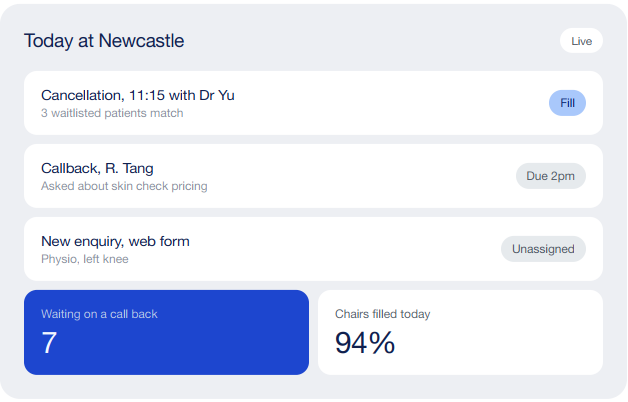
Every enquiry answered without a sticky note

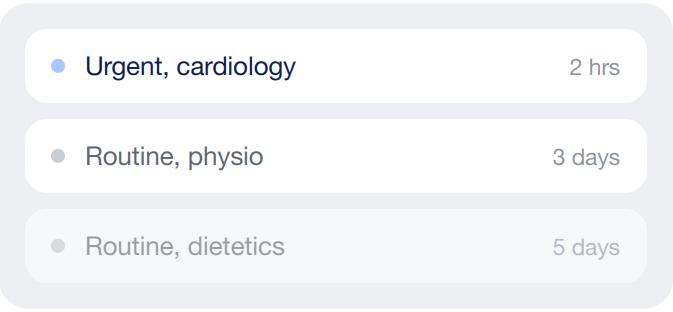
Faxes, secure messages and web enquiries land in one queue and route by urgency

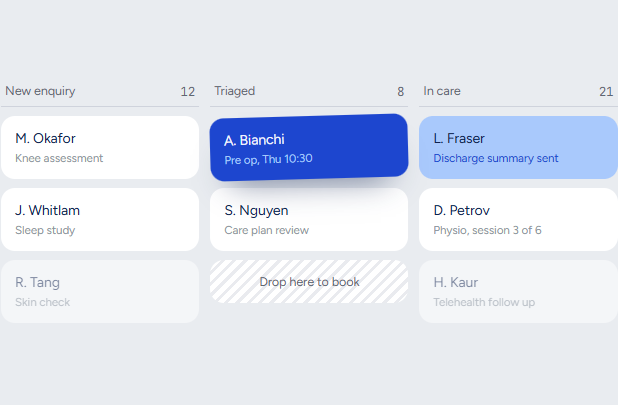
Care pipelines

Move a card forward and the whole clinic knows

Build a board per service line. Advancing a patient triggers the consent form, the booking or the discharge summary.

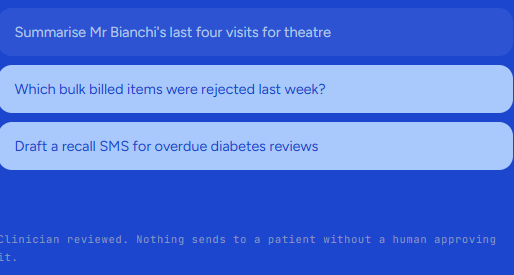
health assist

Ask your practice a question in plain English

Assist drafts referral letters, summarises a history before consult and answers reporting questions. It reads only what the person asking may already see.

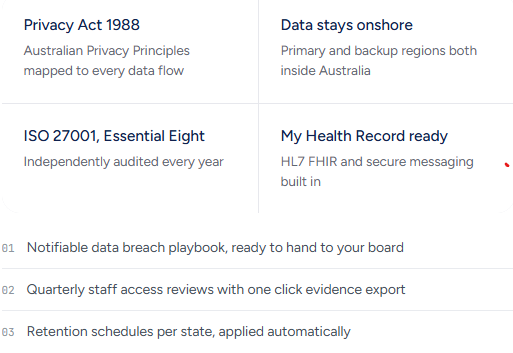
Trust and compliance

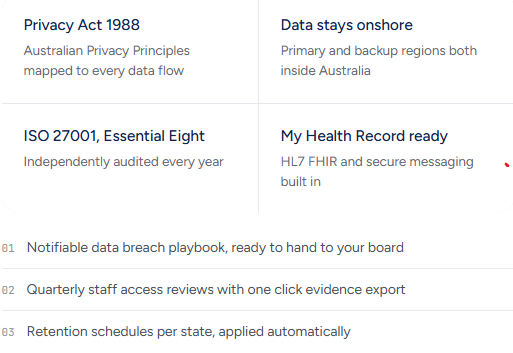
Australian rules, handled as standard

Faxes, secure messages and web enquiries land in one queue and route by urgency

One record per patient. Every team looking at it.

Front desk, clinicians and billing work from one timeline. Nothing gets re keyed, nothing waits on a phone call.

01 / intake

A referral inbox that triages itself

Faxes, secure messages and web enquiries land in one queue and route by urgency

02 / engagement

Recalls and reminders on autopilot

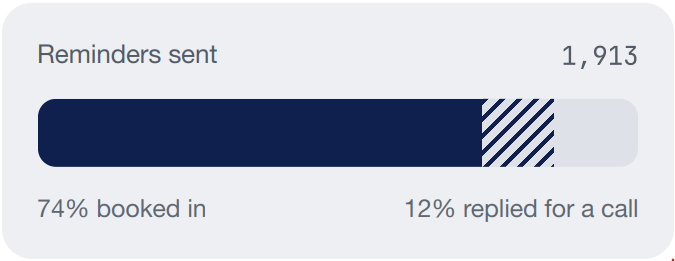
Care plan reviews and screening reminders send on your schedule, with consent tracked per contact.

03 / revenue

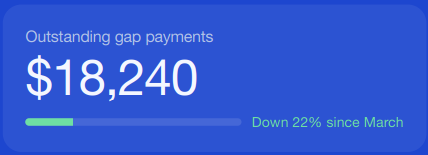
Claims and gaps reconciled nightly

Faxes, secure messages and web enquiries land in one queue and route by urgency

one platform, every service line

Whatever care your team delivers, the patient journeys lives in one place

Recalls, care plans and bulk billing in once place

Nurllabor GP Networks, 4 sites

Lorem ipsum dolor sit amet, consectetur adipiscing elit, sed do eiusmod tempor incididunt ut labore et dolore magna aliqua. 

Picture of John Doe

John Doe

Director, Yarra, Allied

Recalls, care plans and bulk billing in once place

Nurllabor GP Networks, 4 sites

Lorem ipsum dolor sit amet, consectetur adipiscing elit.

Picture of John Doe

John Doe

Director, Yarra, Allied

We replaced four systems and a shared inbox. Reception stopped printing referrals within a fortnight, and the recall revenue paid for our first year by March.

Picture of John Doe

John Doe

Director, Yarra, Allied

MIGRATION

 Your data moved for you, in under three weeks

one platform, every service line

Pricing per user, in Australian dollars

Practice

$31

per user/month

Single site clinics getting off paper and spreadsheets.

Patient records and timeline
Referral inbox
SMS reminders, 500 included
Standard reporting

Practice

$63

per user/month

Single site clinics getting off paper and spreadsheets.

Patient records and timeline
Referral inbox
SMS reminders, 500 included
Standard reporting

Practice

Custom

Single site clinics getting off paper and spreadsheets.

Patient records and timeline
Referral inbox
SMS reminders, 500 included
Standard reporting
Prices exclude GST. Minimum three users. Migration and training included on annual plans

Questions practice managers ask us first

Our clinical team will answer these with your own numbers in front of you.

Does it replace our practice management software?

Lorem ipsum dolor sit amet, consectetur adipiscing elit, sed do eiusmod tempor incididunt ut labore et dolore magna aliqua. Ut enim ad minim veniam, quis nostrud exercitation ullamco laboris nisi ut aliquip ex ea commodo consequat. Duis aute irure dolor in reprehenderit in voluptate velit esse cillum dolore eu fugiat nulla pariatur. Excepteur sint occaecat cupidatat non proident, sunt in culpa qui officia deserunt mollit anim id est laborum.

Lorem ipsum dolor sit amet, consectetur adipiscing elit, sed do eiusmod tempor incididunt ut labore et dolore magna aliqua. Ut enim ad minim veniam, quis nostrud exercitation ullamco laboris nisi ut aliquip ex ea commodo consequat. Duis aute irure dolor in reprehenderit in voluptate velit esse cillum dolore eu fugiat nulla pariatur. Excepteur sint occaecat cupidatat non proident, sunt in culpa qui officia deserunt mollit anim id est laborum.

Lorem ipsum dolor sit amet, consectetur adipiscing elit, sed do eiusmod tempor incididunt ut labore et dolore magna aliqua. Ut enim ad minim veniam, quis nostrud exercitation ullamco laboris nisi ut aliquip ex ea commodo consequat. Duis aute irure dolor in reprehenderit in voluptate velit esse cillum dolore eu fugiat nulla pariatur. Excepteur sint occaecat cupidatat non proident, sunt in culpa qui officia deserunt mollit anim id est laborum.

Lorem ipsum dolor sit amet, consectetur adipiscing elit, sed do eiusmod tempor incididunt ut labore et dolore magna aliqua. Ut enim ad minim veniam, quis nostrud exercitation ullamco laboris nisi ut aliquip ex ea commodo consequat. Duis aute irure dolor in reprehenderit in voluptate velit esse cillum dolore eu fugiat nulla pariatur. Excepteur sint occaecat cupidatat non proident, sunt in culpa qui officia deserunt mollit anim id est laborum.